ImageMobject
Qualified name: manim.mobject.types.image\_mobject.ImageMobject
- class ImageMobject(filename_or_array, scale_to_resolution=1080, invert=False, image_mode='RGBA', **kwargs)[source]
Bases:
AbstractImageMobjectDisplays an Image from a numpy array or a file.
- Parameters:
scale_to_resolution (int) – At this resolution the image is placed pixel by pixel onto the screen, so it will look the sharpest and best. This is a custom parameter of ImageMobject so that rendering a scene with e.g. the
--quality lowor--quality mediumflag for faster rendering won’t effect the position of the image on the screen.filename_or_array (StrPath | npt.NDArray)
invert (bool)
image_mode (str)
kwargs (Any)
Example
Example: ImageFromArray 

from manim import *

class ImageFromArray(Scene):
    def construct(self):
        image = ImageMobject(np.uint8([[0, 100, 30, 200],
                                       [255, 0, 5, 33]]))
        image.height = 7
        self.add(image)
class ImageFromArray(Scene):
    def construct(self):
        image = ImageMobject(np.uint8([[0, 100, 30, 200],
                                       [255, 0, 5, 33]]))
        image.height = 7
        self.add(image)
Changing interpolation style:
Example: ImageInterpolationEx 
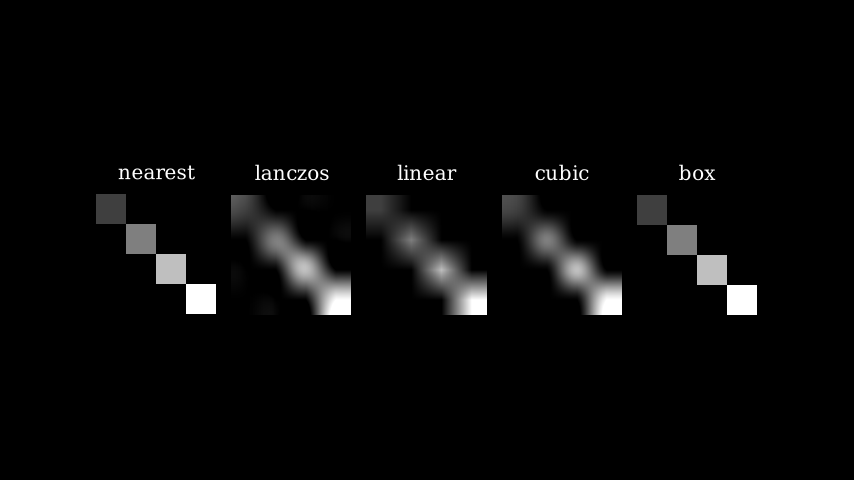
from manim import *

class ImageInterpolationEx(Scene):
    def construct(self):
        img = ImageMobject(np.uint8([[63, 0, 0, 0],
                                        [0, 127, 0, 0],
                                        [0, 0, 191, 0],
                                        [0, 0, 0, 255]
                                        ]))

        img.height = 3

        group = Group()
        algorithm_texts = ["nearest", "linear", "cubic"]
        for algorithm_text in algorithm_texts:
            algorithm = RESAMPLING_ALGORITHMS[algorithm_text]
            img_copy = img.copy().set_resampling_algorithm(algorithm)
            img_copy.add(Text(algorithm_text).scale(0.5).next_to(img_copy, UP))
            group.add(img_copy)

        group.arrange()
        self.add(group)
class ImageInterpolationEx(Scene):
    def construct(self):
        img = ImageMobject(np.uint8([[63, 0, 0, 0],
                                        [0, 127, 0, 0],
                                        [0, 0, 191, 0],
                                        [0, 0, 0, 255]
                                        ]))

        img.height = 3

        group = Group()
        algorithm_texts = ["nearest", "linear", "cubic"]
        for algorithm_text in algorithm_texts:
            algorithm = RESAMPLING_ALGORITHMS[algorithm_text]
            img_copy = img.copy().set_resampling_algorithm(algorithm)
            img_copy.add(Text(algorithm_text).scale(0.5).next_to(img_copy, UP))
            group.add(img_copy)

        group.arrange()
        self.add(group)
Methods
Sets the image's opacity using a 1 - alpha relationship.
A simple getter method.
get_styleInterpolates the array of pixel color values from one ImageMobject into an array of equal size in the target ImageMobject.
Condition is function which takes in one arguments, (x, y, z).
Sets the image's opacity.
Attributes
alwaysCall a method on a mobject every frame.
animateUsed to animate the application of any method of
self.animation_overridesdepthThe depth of the mobject.
heightThe height of the mobject.
widthThe width of the mobject.
original_id- _original__init__(filename_or_array, scale_to_resolution=1080, invert=False, image_mode='RGBA', **kwargs)
Initialize self. See help(type(self)) for accurate signature.
- Parameters:
filename_or_array (StrPath | npt.NDArray)
scale_to_resolution (int)
invert (bool)
image_mode (str)
kwargs (Any)
- Return type:
None
- fade(darkness=0.5, family=True)[source]
Sets the image’s opacity using a 1 - alpha relationship.
- Parameters:
darkness (float) – The alpha value of the object, 1 being transparent and 0 being opaque.
family (bool) – Whether the submobjects of the ImageMobject should be affected.
- Return type:
Self
- interpolate_color(mobject1, mobject2, alpha)[source]
Interpolates the array of pixel color values from one ImageMobject into an array of equal size in the target ImageMobject.
- set_color(color=ManimColor('#F7D96F'), alpha=None, family=True)[source]
Condition is function which takes in one arguments, (x, y, z). Here it just recurses to submobjects, but in subclasses this should be further implemented based on the the inner workings of color
- Parameters:
color (ParsableManimColor)
alpha (Any)
family (bool)
- Return type:
Self