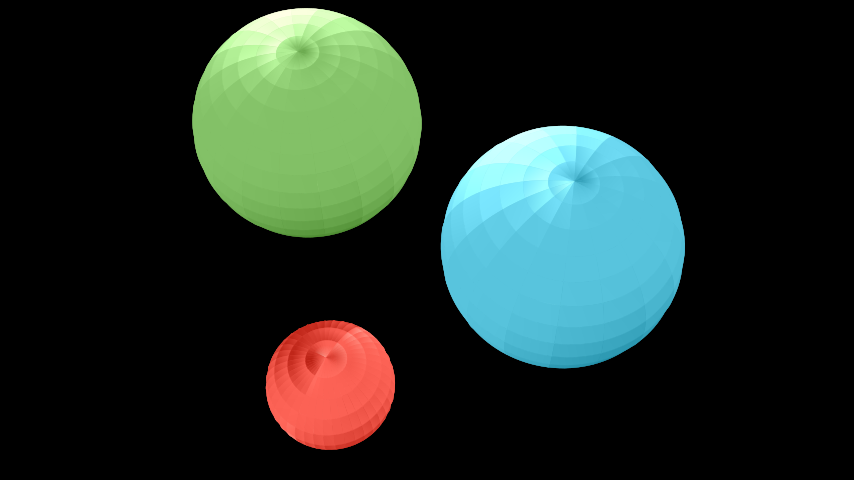
Sphere

Qualified name: manim.mobject.three\_d.three\_dimensions.Sphere

class Sphere(center=array([0., 0., 0.]), radius=1, resolution=None, u_range=(0, 6.283185307179586), v_range=(0, 3.141592653589793), **kwargs)[source]

Bases: Surface

A three-dimensional sphere.

Parameters:
  • center (Point3DLike) – Center of the Sphere.

  • radius (float) – The radius of the Sphere.

  • resolution (int | Sequence[int] | None) – The number of samples taken of the Sphere. A tuple can be used to define different resolutions for u and v respectively.

  • u_range (tuple[float, float]) – The range of the u variable: (u_min, u_max).

  • v_range (tuple[float, float]) – The range of the v variable: (v_min, v_max).

  • kwargs (Any)

Examples

Example: ExampleSphere

../_images/ExampleSphere-1.png
from manim import *

class ExampleSphere(ThreeDScene):
    def construct(self):
        self.set_camera_orientation(phi=PI / 6, theta=PI / 6)
        sphere1 = Sphere(center=(3, 0, 0), radius=1, resolution=(20, 20))
        sphere1.set_color(RED)
        self.add(sphere1)
        sphere2 = Sphere(center=(-1, -3, 0), radius=2, resolution=(18, 18))
        sphere2.set_color(GREEN)
        self.add(sphere2)
        sphere3 = Sphere(center=(-1, 2, 0), radius=2, resolution=(16, 16))
        sphere3.set_color(BLUE)
        self.add(sphere3)
class ExampleSphere(ThreeDScene):
    def construct(self):
        self.set_camera_orientation(phi=PI / 6, theta=PI / 6)
        sphere1 = Sphere(center=(3, 0, 0), radius=1, resolution=(20, 20))
        sphere1.set_color(RED)
        self.add(sphere1)
        sphere2 = Sphere(center=(-1, -3, 0), radius=2, resolution=(18, 18))
        sphere2.set_color(GREEN)
        self.add(sphere2)
        sphere3 = Sphere(center=(-1, 2, 0), radius=2, resolution=(16, 16))
        sphere3.set_color(BLUE)
        self.add(sphere3)

This example shows that overlapping spheres can intersect with rough transitions.

Example: ExampleSphereOverlap

../_images/ExampleSphereOverlap-1.png
from manim import *

class ExampleSphereOverlap(ThreeDScene):
    def construct(self):
        self.set_camera_orientation(phi=PI / 4, theta=PI / 4)
        sphere1 = Sphere(center=(0, 0, 0), radius=1, resolution=(20, 20))
        sphere1.set_color(RED)
        self.add(sphere1)
        sphere2 = Sphere(center=(-0.5, -1, 0.5), radius=1.2, resolution=(20, 20))
        sphere2.set_color(GREEN)
        self.add(sphere2)
        sphere3 = Sphere(center=(1, -1, 0), radius=1.1, resolution=(20, 20))
        sphere3.set_color(BLUE)
        self.add(sphere3)
class ExampleSphereOverlap(ThreeDScene):
    def construct(self):
        self.set_camera_orientation(phi=PI / 4, theta=PI / 4)
        sphere1 = Sphere(center=(0, 0, 0), radius=1, resolution=(20, 20))
        sphere1.set_color(RED)
        self.add(sphere1)
        sphere2 = Sphere(center=(-0.5, -1, 0.5), radius=1.2, resolution=(20, 20))
        sphere2.set_color(GREEN)
        self.add(sphere2)
        sphere3 = Sphere(center=(1, -1, 0), radius=1.1, resolution=(20, 20))
        sphere3.set_color(BLUE)
        self.add(sphere3)

In this example, by modifying u_range (the range of the azimuthal angle) and v_range (the range of the polar angle), it is possible to obtain a portion of a sphere:

Example: ExamplePartialSpheres

../_images/ExamplePartialSpheres-1.png
from manim import *

class ExamplePartialSpheres(ThreeDScene):
    def construct(self):
        self.set_camera_orientation(phi=PI / 4)
        sphere1 = Sphere(
            center=(-3, 0, 0),
            resolution=(10, 20),
            u_range=[TAU / 4, 3 * TAU / 4],
        )
        sphere1.set_color(RED)
        self.add(sphere1)
        sphere2 = Sphere(
            center=(0, 0, 0),
            resolution=(20, 10),
            v_range=[0, TAU / 4],
        )
        sphere2.set_color(GREEN)
        self.add(sphere2)
        sphere3 = Sphere(
            center=(3, 0, 0),
            resolution=(5, 10),
            u_range=[3 * TAU / 4, TAU],
            v_range=[TAU / 4, TAU / 2],
        )
        sphere3.set_color(BLUE)
        self.add(sphere3)
class ExamplePartialSpheres(ThreeDScene):
    def construct(self):
        self.set_camera_orientation(phi=PI / 4)
        sphere1 = Sphere(
            center=(-3, 0, 0),
            resolution=(10, 20),
            u_range=[TAU / 4, 3 * TAU / 4],
        )
        sphere1.set_color(RED)
        self.add(sphere1)
        sphere2 = Sphere(
            center=(0, 0, 0),
            resolution=(20, 10),
            v_range=[0, TAU / 4],
        )
        sphere2.set_color(GREEN)
        self.add(sphere2)
        sphere3 = Sphere(
            center=(3, 0, 0),
            resolution=(5, 10),
            u_range=[3 * TAU / 4, TAU],
            v_range=[TAU / 4, TAU / 2],
        )
        sphere3.set_color(BLUE)
        self.add(sphere3)

Methods

func

The z values defining the Sphere being plotted.

Attributes

always

Call a method on a mobject every frame.

animate

Used to animate the application of any method of self.

animation_overrides

color

depth

The depth of the mobject.

fill_color

If there are multiple colors (for gradient) this returns the first one

height

The height of the mobject.

n_points_per_curve

sheen_factor

stroke_color

width

The width of the mobject.

target

original_id

_original__init__(center=array([0., 0., 0.]), radius=1, resolution=None, u_range=(0, 6.283185307179586), v_range=(0, 3.141592653589793), **kwargs)

Initialize self. See help(type(self)) for accurate signature.

Parameters:
  • center (Point3DLike)

  • radius (float)

  • resolution (int | Sequence[int] | None)

  • u_range (tuple[float, float])

  • v_range (tuple[float, float])

  • kwargs (Any)

Return type:

None

func(u, v)[source]

The z values defining the Sphere being plotted.

Returns:

The z values defining the Sphere.

Return type:

Point3D

Parameters:
  • u (float)

  • v (float)