Mobject
Qualified name: manim.mobject.mobject.Mobject
- class Mobject(color=ManimColor('#FFFFFF'), name=None, dim=3, target=None, z_index=0)[source]
Bases:
objectMathematical Object: base class for objects that can be displayed on screen.
There is a compatibility layer that allows for getting and setting generic attributes with
get_*andset_*methods. Seeset()for more details.- Parameters:
color (ParsableManimColor | list[ParsableManimColor])
name (str | None)
dim (int)
z_index (float)
Methods
Add mobjects as submobjects.
Add an animation override.
Add a BackgroundRectangle as submobject.
add_background_rectangle_to_family_members_with_pointsadd_background_rectangle_to_submobjectsadd_n_more_submobjectsAdd all passed mobjects to the back of the submobjects.
Add an update function to this mobject.
Aligns the family structure and data of this mobject with another mobject.
Direction just needs to be a vector pointing towards side or corner in the 2d plane.
align_pointsalign_points_with_largeralign_submobjectsAligns mobject to another
Mobjectin a certain direction.Returns the function defining a specific animation override for this class.
Applies a complex function to a
Mobject.apply_functionapply_function_to_positionapply_function_to_submobject_positionsapply_matrixapply_over_attr_arraysapply_points_function_about_pointApply a function to
selfand every submobject with points recursively.Sorts
Mobjectnext to each other on screen.Arrange submobjects in a grid.
Arrange the position of
submobjectswith a small buffer.Edit points, colors and submobjects to be identical to another
MobjectMoves the center of the mobject to the center of the scene.
Remove every updater.
Create and return an identical copy of the
Mobjectincluding allsubmobjects.fadefade_toFilters the list of family members (generated by
get_family()) to include only mobjects with points.Flips/Mirrors an mobject about its center.
Initializes
pointsand therefore the shape.generate_targetReturn all points from this mobject and all submobjects.
get_array_attrsGet bottom Point3Ds of a box bounding the
Mobjectget_boundary_pointGet center Point3Ds
get_center_of_massReturns the color of the
MobjectMeant to generalize
get_x,get_yandget_zGet corner Point3Ds for certain direction.
Picture a box bounding the
Mobject.Get edge Point3Ds for certain direction.
Returns the point, where the stroke that surrounds the
Mobjectends.get_extremum_along_dimLists all mobjects in the hierarchy (family) of the given mobject, including the mobject itself and all its submobjects recursively.
get_family_updatersget_group_classget_imageGet left Point3Ds of a box bounding the
MobjectReturn all of a given attribute from this mobject and all submobjects.
Get Point3Ds of the middle of the path that forms the
Mobject.Return the base class of this mobject type.
Get nadir (opposite the zenith) Point3Ds of a box bounding a 3D
Mobject.get_num_pointsget_piecesThe simplest
Mobjectto be transformed to or from self.get_points_defining_boundaryGet right Point3Ds of a box bounding the
MobjectReturns the point, where the stroke that surrounds the
Mobjectstarts.Returns starting and ending point of a stroke as a
tuple.Return all updaters using the
dtparameter.Get top Point3Ds of a box bounding the
MobjectReturn all updaters.
Returns x Point3D of the center of the
MobjectasfloatReturns y Point3D of the center of the
MobjectasfloatReturns z Point3D of the center of the
Mobjectasfloatget_z_index_reference_pointGet zenith Point3Ds of a box bounding a 3D
Mobject.Check if
Mobjectdoes not contains points.Check if
Mobjectcontains points.Test if
selfhas a time based updater.Initializes the colors.
Inserts a mobject at a specific position into self.submobjects
Turns this
Mobjectinto an interpolation betweenmobject1andmobject2.interpolate_colorInverts the list of
submobjects.is_off_screenMeasure the length of an
Mobjectin a certain direction.Match the color with the color of another
Mobject.Match the Point3Ds with the Point3Ds of another
Mobject.Match the depth with the depth of another
Mobject.Match the specified dimension with the dimension of another
Mobject.Match the height with the height of another
Mobject.Edit points, positions, and submobjects to be identical to another
Mobject, while keeping the style unchanged.Match the updaters of the given mobject.
Match the width with the width of another
Mobject.Match x coord.
Match y coord.
Match z coord.
Move center of the
Mobjectto certain Point3D.nonempty_submobjectsIf a
Mobjectwith points is being aligned to one without, treat both as groups, and push the one with points into its own submobjects list.point_from_proportionpose_at_angleproportion_from_pointpush_self_into_submobjectsput_start_and_end_onFind the min or max value from a dimension across all points in this and submobjects.
Remove
submobjects.Remove an updater.
This can make transition animations nicer
repeat_submobjectreplacerescale_to_fitSets
pointsto be an empty array.Restores the state that was previously saved with
save_state().Enable updating from updaters and animations.
reverse_pointsRotates the
Mobjectaround a specified axis and point.Rotates the
Mobjectabout the ORIGIN, which is at [0,0,0].Saves an image of only this
Mobjectat its position to a png file.Save the current state (position, color & size).
Scale the size by a factor.
Scales the
Mobjectto fit a depth while keeping width/height proportional.Scales the
Mobjectto fit a height while keeping width/depth proportional.Scales the
Mobjectto fit a width while keeping height/depth proportional.Sets attributes.
Condition is function which takes in one arguments, (x, y, z).
set_colors_by_radial_gradientset_coordSets the default values of keyword arguments.
set_submobject_colors_by_gradientset_submobject_colors_by_radial_gradientSet x value of the center of the
Mobject(intorfloat)Set y value of the center of the
Mobject(intorfloat)Set z value of the center of the
Mobject(intorfloat)Sets the
Mobject'sz_indexto the value specified in z_index_value.Sets the
Mobject's z Point3D to the value ofz_index.Shift by the given vectors.
shift_onto_screenshowShuffles the list of
submobjects.Shuffles the order of
submobjectsSorts the list of
submobjectsby a function defined bysubmob_func.Sort the
submobjectsspace_out_submobjectssplitstretchstretch_about_pointStretches the
Mobjectto fit a depth, not keeping width/height proportional.Stretches the
Mobjectto fit a height, not keeping width/depth proportional.Stretches the
Mobjectto fit a width, not keeping height/depth proportional.surroundDisable updating from updaters and animations.
throw_error_if_no_pointsMoves this
Mobjectto the given corner of the screen.Moves this
Mobjectto the given edge of the screen, without affecting its position in the other dimension.to_original_colorApply all updaters.
Attributes
Call a method on a mobject every frame.
Used to animate the application of any method of
self.animation_overridesThe depth of the mobject.
The height of the mobject.
The width of the mobject.
- classmethod _add_intrinsic_animation_overrides()[source]
Initializes animation overrides marked with the
override_animation()decorator.- Return type:
None
- _assert_valid_submobjects(submobjects)[source]
Check that all submobjects are actually instances of
Mobject, and that none of them isself(aMobjectcannot contain itself).This is an auxiliary function called when adding Mobjects to the
submobjectslist.This function is intended to be overridden by subclasses such as
VMobject, which should assert that only other VMobjects may be added into it.
- add(*mobjects)[source]
Add mobjects as submobjects.
The mobjects are added to
submobjects.Subclasses of mobject may implement
+and+=dunder methods.- Parameters:
mobjects (Mobject) – The mobjects to add.
- Returns:
self- Return type:
- Raises:
ValueError – When a mobject tries to add itself.
TypeError – When trying to add an object that is not an instance of
Mobject.
Notes
A mobject cannot contain itself, and it cannot contain a submobject more than once. If the parent mobject is displayed, the newly-added submobjects will also be displayed (i.e. they are automatically added to the parent Scene).
See also
Examples
>>> outer = Mobject()
>>> inner = Mobject()
>>> outer = outer.add(inner)
Duplicates are not added again:
>>> outer = outer.add(inner)
>>> len(outer.submobjects)
1
Only Mobjects can be added:
>>> outer.add(3)
Traceback (most recent call last):
...
TypeError: Only values of type Mobject can be added as submobjects of Mobject, but the value 3 (at index 0) is of type int.
Adding an object to itself raises an error:
>>> outer.add(outer)
Traceback (most recent call last):
...
ValueError: Cannot add Mobject as a submobject of itself (at index 0).
A given mobject cannot be added as a submobject twice to some parent:
>>> parent = Mobject(name="parent")
>>> child = Mobject(name="child")
>>> parent.add(child, child)
[...] WARNING  ...
parent
>>> parent.submobjects
[child]
- classmethod add_animation_override(animation_class, override_func)[source]
Add an animation override.
This does not apply to subclasses.
- Parameters:
animation_class (type[Animation]) – The animation type to be overridden
override_func (FunctionOverride) – The function returning an animation replacing the default animation. It gets passed the parameters given to the animation constructor.
- Raises:
MultiAnimationOverrideException – If the overridden animation was already overridden.
- Return type:
None
- add_background_rectangle(color=None, opacity=0.75, **kwargs)[source]
Add a BackgroundRectangle as submobject.
The BackgroundRectangle is added behind other submobjects.
This can be used to increase the mobjects visibility in front of a noisy background.
- Parameters:
color (ParsableManimColor | None) – The color of the BackgroundRectangle
opacity (float) – The opacity of the BackgroundRectangle
kwargs – Additional keyword arguments passed to the BackgroundRectangle constructor
- Returns:
self- Return type:
See also
- add_to_back(*mobjects)[source]
Add all passed mobjects to the back of the submobjects.
If
submobjectsalready contains the given mobjects, they just get moved to the back instead.Note
Technically, this is done by adding (or moving) the mobjects to the head of
submobjects. The head of this list is rendered first, which places the corresponding mobjects behind the subsequent list members.- Raises:
ValueError – When a mobject tries to add itself.
TypeError – When trying to add an object that is not an instance of
Mobject.
- Parameters:
mobjects (Mobject)
- Return type:
Self
Notes
A mobject cannot contain itself, and it cannot contain a submobject more than once. If the parent mobject is displayed, the newly-added submobjects will also be displayed (i.e. they are automatically added to the parent Scene).
- add_updater(update_function, index=None, call_updater=False)[source]
Add an update function to this mobject.
Update functions, or updaters in short, are functions that are applied to the Mobject in every frame.
- Parameters:
update_function (Updater) – The update function to be added. Whenever
update()is called, this update function gets called usingselfas the first parameter. The updater can have a second parameterdt. If it uses this parameter, it gets called using a second valuedt, usually representing the time in seconds since the last call ofupdate().index (int | None) – The index at which the new updater should be added in
self.updaters. In caseindexisNonethe updater will be added at the end.call_updater (bool) – Whether or not to call the updater initially. If
True, the updater will be called usingdt=0.
- Returns:
self- Return type:
Examples
Example: NextToUpdater 
from manim import *

class NextToUpdater(Scene):
    def construct(self):
        def update_label(mobject):
            mobject.set_value(dot.get_center()[0])
            mobject.next_to(dot)

        dot = Dot(RIGHT*3)
        label = DecimalNumber()
        label.add_updater(update_label)
        self.add(dot, label)

        self.play(Rotating(dot, angle=TAU, about_point=ORIGIN, run_time=TAU, rate_func=linear))
class NextToUpdater(Scene):
    def construct(self):
        def update_label(mobject):
            mobject.set_value(dot.get_center()[0])
            mobject.next_to(dot)

        dot = Dot(RIGHT*3)
        label = DecimalNumber()
        label.add_updater(update_label)
        self.add(dot, label)

        self.play(Rotating(dot, angle=TAU, about_point=ORIGIN, run_time=TAU, rate_func=linear))
Example: DtUpdater 
from manim import *

class DtUpdater(Scene):
    def construct(self):
        square = Square()

        #Let the square rotate 90° per second
        square.add_updater(lambda mobject, dt: mobject.rotate(dt*90*DEGREES))
        self.add(square)
        self.wait(2)
class DtUpdater(Scene):
    def construct(self):
        square = Square()

        #Let the square rotate 90° per second
        square.add_updater(lambda mobject, dt: mobject.rotate(dt*90*DEGREES))
        self.add(square)
        self.wait(2)
See also
get_updaters(),remove_updater(),UpdateFromFunc,Rotating,rotate(),animate
- align_data(mobject, skip_point_alignment=False)[source]
Aligns the family structure and data of this mobject with another mobject.
Afterwards, the two mobjects will have the same number of submobjects (see
align_submobjects()) and the same parent structure (seenull_point_align()). Ifskip_point_alignmentisFalse, they will also have the same number of points (seealign_points()).- Parameters:
mobject (Mobject) – The other mobject this mobject should be aligned to.
skip_point_alignment (bool) – Controls whether or not the computationally expensive point alignment is skipped (default:
False).
- Return type:
None
Note
This method is primarily used internally by
become()and theTransformanimation to ensure that mobjects are structurally compatible before transformation.Examples
>>> from manim import Rectangle, Line, ORIGIN, RIGHT
>>> rect = Rectangle(width=4.0, height=2.0, grid_xstep=1.0, grid_ystep=0.5)
>>> line = Line(start=ORIGIN,end=RIGHT)
>>> line.align_data(rect)
>>> len(line.get_family()) == len(rect.get_family())
True
>>> line.get_num_points() == rect.get_num_points()
True
See also
- align_on_border(direction, buff=0.5)[source]
Direction just needs to be a vector pointing towards side or corner in the 2d plane.
- Parameters:
direction (Vector3DLike)
buff (float)
- Return type:
Self
- align_to(mobject_or_point, direction=array([0., 0., 0.]))[source]
Aligns mobject to another
Mobjectin a certain direction.Examples: mob1.align_to(mob2, UP) moves mob1 vertically so that its top edge lines ups with mob2’s top edge.
- Parameters:
mobject_or_point (Mobject | Point3DLike)
direction (Vector3DLike)
- Return type:
Self
- property always: Self
Call a method on a mobject every frame.
This is syntactic sugar for
mob.add_updater(lambda m: m.method(*args, **kwargs), call_updater=True). Note that this will call the method immediately. If this behavior is not desired, you should useadd_updater()directly.Warning
Chaining of methods is allowed, but each method will be added as its own updater. If you are chaining methods, make sure they do not interfere with each other or you may get unexpected results.
Warning
alwaysis not compatible withValueTracker.get_value(), because the value will be computed once and then never updated again. Useadd_updater()if you would like to use aValueTrackerto update the value.Example
Example: AlwaysExample 
from manim import *

class AlwaysExample(Scene):
    def construct(self):
        sq = Square().to_edge(LEFT)
        t = Text("Hello World!")
        t.always.next_to(sq, UP)
        self.add(sq, t)
        self.play(sq.animate.to_edge(RIGHT))
class AlwaysExample(Scene):
    def construct(self):
        sq = Square().to_edge(LEFT)
        t = Text("Hello World!")
        t.always.next_to(sq, UP)
        self.add(sq, t)
        self.play(sq.animate.to_edge(RIGHT))
- property animate: _AnimationBuilder | Self
Used to animate the application of any method of
self.Any method called on
animateis converted to an animation of applying that method on the mobject itself.For example,
square.set_fill(WHITE)sets the fill color of a square, whilesquare.animate.set_fill(WHITE)animates this action.Multiple methods can be put in a single animation once via chaining:
self.play(my_mobject.animate.shift(RIGHT).rotate(PI))
Warning
Passing multiple animations for the same
Mobjectin one call toplay()is discouraged and will most likely not work properly. Instead of writing an animation likeself.play( my_mobject.animate.shift(RIGHT), my_mobject.animate.rotate(PI) )
make use of method chaining.
Keyword arguments that can be passed to
Scene.play()can be passed directly after accessing.animate, like so:self.play(my_mobject.animate(rate_func=linear).shift(RIGHT))
This is especially useful when animating simultaneous
.animatecalls that you want to behave differently:self.play( mobject1.animate(run_time=2).rotate(PI), mobject2.animate(rate_func=there_and_back).shift(RIGHT), )
See also
Examples
Example: AnimateExample 
from manim import *

class AnimateExample(Scene):
    def construct(self):
        s = Square()
        self.play(Create(s))
        self.play(s.animate.shift(RIGHT))
        self.play(s.animate.scale(2))
        self.play(s.animate.rotate(PI / 2))
        self.play(Uncreate(s))
class AnimateExample(Scene):
    def construct(self):
        s = Square()
        self.play(Create(s))
        self.play(s.animate.shift(RIGHT))
        self.play(s.animate.scale(2))
        self.play(s.animate.rotate(PI / 2))
        self.play(Uncreate(s))
Example: AnimateChainExample 
from manim import *

class AnimateChainExample(Scene):
    def construct(self):
        s = Square()
        self.play(Create(s))
        self.play(s.animate.shift(RIGHT).scale(2).rotate(PI / 2))
        self.play(Uncreate(s))
class AnimateChainExample(Scene):
    def construct(self):
        s = Square()
        self.play(Create(s))
        self.play(s.animate.shift(RIGHT).scale(2).rotate(PI / 2))
        self.play(Uncreate(s))
Example: AnimateWithArgsExample 
from manim import *

class AnimateWithArgsExample(Scene):
    def construct(self):
        s = Square()
        c = Circle()

        VGroup(s, c).arrange(RIGHT, buff=2)
        self.add(s, c)

        self.play(
            s.animate(run_time=2).rotate(PI / 2),
            c.animate(rate_func=there_and_back).shift(RIGHT),
        )
class AnimateWithArgsExample(Scene):
    def construct(self):
        s = Square()
        c = Circle()

        VGroup(s, c).arrange(RIGHT, buff=2)
        self.add(s, c)

        self.play(
            s.animate(run_time=2).rotate(PI / 2),
            c.animate(rate_func=there_and_back).shift(RIGHT),
        )
Warning
.animatewill interpolate the
Mobjectbetween its points prior to.animateand its points after applying.animateto it. This may result in unexpected behavior when attempting to interpolate along paths, or rotations (seerotate()). If you want animations to consider the points between, consider usingValueTrackerwith updaters instead (seeadd_updater()).
- classmethod animation_override_for(animation_class)[source]
Returns the function defining a specific animation override for this class.
- apply_complex_function(function, *, about_point=None, about_edge=None)[source]
Applies a complex function to a
Mobject. The x and y Point3Ds correspond to the real and imaginary parts respectively.Example
Example: ApplyFuncExample 
from manim import *

class ApplyFuncExample(Scene):
    def construct(self):
        circ = Circle().scale(1.5)
        circ_ref = circ.copy()
        circ.apply_complex_function(
            lambda x: np.exp(x*1j)
        )
        t = ValueTracker(0)
        circ.add_updater(
            lambda x: x.become(circ_ref.copy().apply_complex_function(
                lambda x: np.exp(x+t.get_value()*1j)
            )).set_color(BLUE)
        )
        self.add(circ_ref)
        self.play(TransformFromCopy(circ_ref, circ))
        self.play(t.animate.set_value(TAU), run_time=3)
class ApplyFuncExample(Scene): def construct(self): circ = Circle().scale(1.5) circ_ref = circ.copy() circ.apply_complex_function( lambda x: np.exp(x*1j) ) t = ValueTracker(0) circ.add_updater( lambda x: x.become(circ_ref.copy().apply_complex_function( lambda x: np.exp(x+t.get_value()*1j) )).set_color(BLUE) ) self.add(circ_ref) self.play(TransformFromCopy(circ_ref, circ)) self.play(t.animate.set_value(TAU), run_time=3)- Parameters:
function (Callable[[complex], complex])
about_point (Point3DLike | None)
about_edge (Vector3DLike | None)
- Return type:
Self
- apply_to_family(func)[source]
Apply a function to
selfand every submobject with points recursively.- Parameters:
func (Callable[[Mobject], None]) – The function to apply to each mobject.
funcgets passed the respective (sub)mobject as parameter.- Returns:
self- Return type:
See also
- arrange(direction=array([1., 0., 0.]), buff=0.25, center=True, **kwargs)[source]
Sorts
Mobjectnext to each other on screen.Examples
Example: Example 
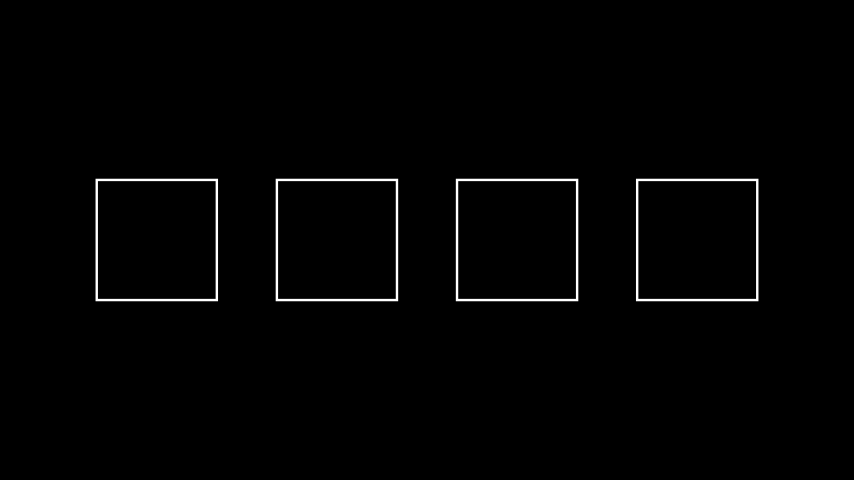
from manim import *

class Example(Scene):
    def construct(self):
        s1 = Square()
        s2 = Square()
        s3 = Square()
        s4 = Square()
        x = VGroup(s1, s2, s3, s4).set_x(0).arrange(buff=1.0)
        self.add(x)
class Example(Scene): def construct(self): s1 = Square() s2 = Square() s3 = Square() s4 = Square() x = VGroup(s1, s2, s3, s4).set_x(0).arrange(buff=1.0) self.add(x)- Parameters:
direction (Vector3DLike)
buff (float)
center (bool)
- Return type:
Self
- arrange_in_grid(rows=None, cols=None, buff=0.25, cell_alignment=array([0., 0., 0.]), row_alignments=None, col_alignments=None, row_heights=None, col_widths=None, flow_order='rd', **kwargs)[source]
Arrange submobjects in a grid.
- Parameters:
rows (int | None) – The number of rows in the grid.
cols (int | None) – The number of columns in the grid.
buff (float | tuple[float, float]) – The gap between grid cells. To specify a different buffer in the horizontal and vertical directions, a tuple of two values can be given -
(row, col).cell_alignment (Vector3DLike) – The way each submobject is aligned in its grid cell.
row_alignments (str | None) – The vertical alignment for each row (top to bottom). Accepts the following characters:
"u"- up,"c"- center,"d"- down.col_alignments (str | None) – The horizontal alignment for each column (left to right). Accepts the following characters
"l"- left,"c"- center,"r"- right.row_heights (Iterable[float | None] | None) – Defines a list of heights for certain rows (top to bottom). If the list contains
None, the corresponding row will fit its height automatically based on the highest element in that row.col_widths (Iterable[float | None] | None) – Defines a list of widths for certain columns (left to right). If the list contains
None, the corresponding column will fit its width automatically based on the widest element in that column.flow_order (str) – The order in which submobjects fill the grid. Can be one of the following values: “rd”, “dr”, “ld”, “dl”, “ru”, “ur”, “lu”, “ul”. (“rd” -> fill rightwards then downwards)
- Returns:
self- Return type:
- Raises:
ValueError – If
rowsandcolsare too small to fit all submobjects.ValueError – If
cols,col_alignmentsandcol_widthsorrows,row_alignmentsandrow_heightshave mismatching sizes.
Notes
If only one of
colsandrowsis set implicitly, the other one will be chosen big enough to fit all submobjects. If neither is set, they will be chosen to be about the same, tending towardscols>rows(simply because videos are wider than they are high).If both
cell_alignmentandrow_alignments/col_alignmentsare defined, the latter has higher priority.Examples
Example: ExampleBoxes 
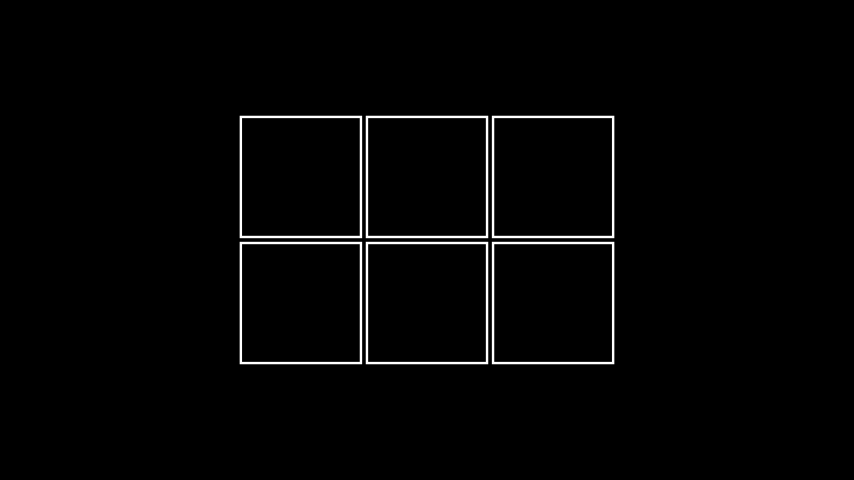
from manim import *

class ExampleBoxes(Scene):
    def construct(self):
        boxes=VGroup(*[Square() for s in range(0,6)])
        boxes.arrange_in_grid(rows=2, buff=0.1)
        self.add(boxes)
class ExampleBoxes(Scene):
    def construct(self):
        boxes=VGroup(*[Square() for s in range(0,6)])
        boxes.arrange_in_grid(rows=2, buff=0.1)
        self.add(boxes)
Example: ArrangeInGrid 
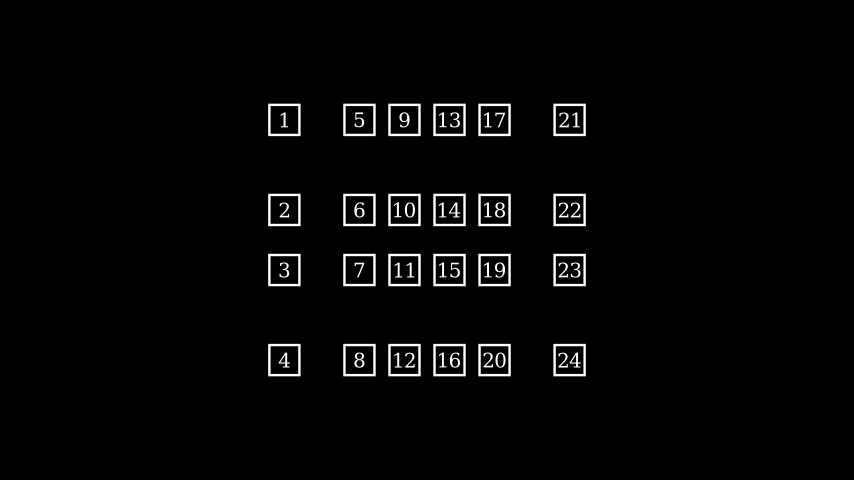
from manim import *

class ArrangeInGrid(Scene):
    def construct(self):
        boxes = VGroup(*[
            Rectangle(WHITE, 0.5, 0.5).add(Text(str(i+1)).scale(0.5))
            for i in range(24)
        ])
        self.add(boxes)

        boxes.arrange_in_grid(
            buff=(0.25,0.5),
            col_alignments="lccccr",
            row_alignments="uccd",
            col_widths=[1, *[None]*4, 1],
            row_heights=[1, None, None, 1],
            flow_order="dr"
        )
class ArrangeInGrid(Scene):
    def construct(self):
        boxes = VGroup(*[
            Rectangle(WHITE, 0.5, 0.5).add(Text(str(i+1)).scale(0.5))
            for i in range(24)
        ])
        self.add(boxes)

        boxes.arrange_in_grid(
            buff=(0.25,0.5),
            col_alignments="lccccr",
            row_alignments="uccd",
            col_widths=[1, *[None]*4, 1],
            row_heights=[1, None, None, 1],
            flow_order="dr"
        )
- arrange_submobjects(*args, **kwargs)[source]
Arrange the position of
submobjectswith a small buffer.Examples
Example: ArrangeSumobjectsExample 
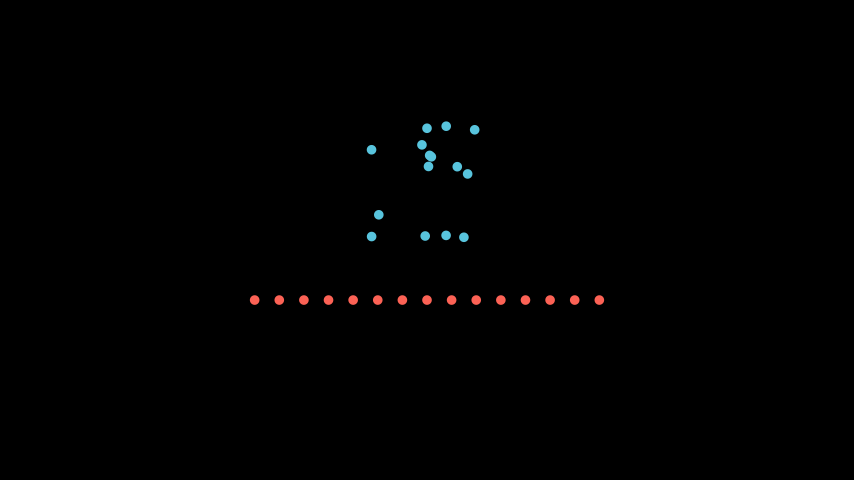
from manim import *

class ArrangeSumobjectsExample(Scene):
    def construct(self):
        s= VGroup(*[Dot().shift(i*0.1*RIGHT*np.random.uniform(-1,1)+UP*np.random.uniform(-1,1)) for i in range(0,15)])
        s.shift(UP).set_color(BLUE)
        s2= s.copy().set_color(RED)
        s2.arrange_submobjects()
        s2.shift(DOWN)
        self.add(s,s2)
class ArrangeSumobjectsExample(Scene): def construct(self): s= VGroup(*[Dot().shift(i*0.1*RIGHT*np.random.uniform(-1,1)+UP*np.random.uniform(-1,1)) for i in range(0,15)]) s.shift(UP).set_color(BLUE) s2= s.copy().set_color(RED) s2.arrange_submobjects() s2.shift(DOWN) self.add(s,s2)- Return type:
Self
- become(mobject, match_height=False, match_width=False, match_depth=False, match_center=False, stretch=False)[source]
Edit points, colors and submobjects to be identical to another
MobjectNote
If both match_height and match_width are
Truethen the transformedMobjectwill match the height first and then the width.- Parameters:
match_height (bool) – Whether or not to preserve the height of the original
Mobject.match_width (bool) – Whether or not to preserve the width of the original
Mobject.match_depth (bool) – Whether or not to preserve the depth of the original
Mobject.match_center (bool) – Whether or not to preserve the center of the original
Mobject.stretch (bool) – Whether or not to stretch the target mobject to match the the proportions of the original
Mobject.mobject (Mobject)
- Return type:
Self
Examples
Example: BecomeScene 
from manim import *

class BecomeScene(Scene):
    def construct(self):
        circ = Circle(fill_color=RED, fill_opacity=0.8)
        square = Square(fill_color=BLUE, fill_opacity=0.2)
        self.add(circ)
        self.wait(0.5)
        circ.become(square)
        self.wait(0.5)
class BecomeScene(Scene):
    def construct(self):
        circ = Circle(fill_color=RED, fill_opacity=0.8)
        square = Square(fill_color=BLUE, fill_opacity=0.2)
        self.add(circ)
        self.wait(0.5)
        circ.become(square)
        self.wait(0.5)
The following examples illustrate how mobject measurements change when using the
match_...andstretcharguments. We start with a rectangle that is 2 units high and 4 units wide, which we want to turn into a circle of radius 3:>>> from manim import Rectangle, Circle >>> import numpy as np >>> rect = Rectangle(height=2, width=4) >>> circ = Circle(radius=3)
With
stretch=True, the target circle is deformed to match the proportions of the rectangle, which results in the target mobject being an ellipse with height 2 and width 4. We can check that the resulting points satisfy the ellipse equation \(x^2/a^2 + y^2/b^2 = 1\) with \(a = 4/2\) and \(b = 2/2\) being the semi-axes:>>> result = rect.copy().become(circ, stretch=True) >>> result.height, result.width (np.float64(2.0), np.float64(4.0)) >>> ellipse_points = np.array(result.get_anchors()) >>> ellipse_eq = np.sum(ellipse_points**2 * [1/4, 1, 0], axis=1) >>> np.allclose(ellipse_eq, 1) True
With
match_height=Trueandmatch_width=Truethe circle is scaled such that the height or the width of the rectangle will be preserved, respectively. The points of the resulting mobject satisfy the circle equation \(x^2 + y^2 = r^2\) for the corresponding radius \(r\):>>> result = rect.copy().become(circ, match_height=True) >>> result.height, result.width (np.float64(2.0), np.float64(2.0)) >>> circle_points = np.array(result.get_anchors()) >>> circle_eq = np.sum(circle_points**2, axis=1) >>> np.allclose(circle_eq, 1) True >>> result = rect.copy().become(circ, match_width=True) >>> result.height, result.width (np.float64(4.0), np.float64(4.0)) >>> circle_points = np.array(result.get_anchors()) >>> circle_eq = np.sum(circle_points**2, axis=1) >>> np.allclose(circle_eq, 2**2) True
With
match_center=True, the resulting mobject is moved such that its center is the same as the center of the original mobject:>>> rect = rect.shift(np.array([0, 1, 0])) >>> np.allclose(rect.get_center(), circ.get_center()) False >>> result = rect.copy().become(circ, match_center=True) >>> np.allclose(rect.get_center(), result.get_center()) True
See also
align_data(),interpolate_color()
- center()[source]
Moves the center of the mobject to the center of the scene.
- Returns:
The centered mobject.
- Return type:
- clear_updaters(recursive=True)[source]
Remove every updater.
- Parameters:
recursive (bool) – Whether to recursively call
clear_updaterson all submobjects.- Returns:
self- Return type:
See also
- copy()[source]
Create and return an identical copy of the
Mobjectincluding allsubmobjects.- Returns:
The copy.
- Return type:
Note
The clone is initially not visible in the Scene, even if the original was.
- property depth: float
The depth of the mobject.
- Return type:
float
See also
- family_members_with_points()[source]
Filters the list of family members (generated by
get_family()) to include only mobjects with points.- Returns:
A list of mobjects that have points.
- Return type:
list[Mobject]
Examples
>>> from manim import Square, Rectangle, VGroup, Group, Mobject, VMobject
>>> s, r, m, v = Square(), Rectangle(), Mobject(), VMobject()
>>> vg = VGroup(s, r)
>>> gr = Group(vg, m, v)
>>> gr.family_members_with_points()
[Square, Rectangle]
See also
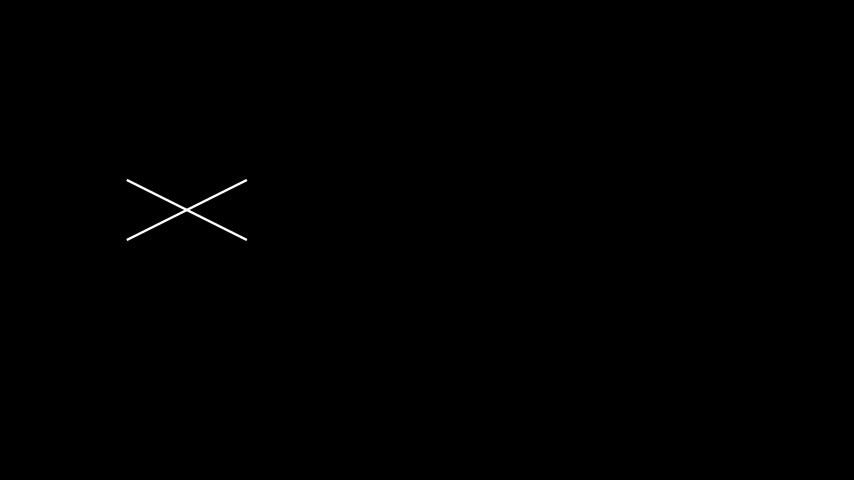
- flip(axis=array([0., 1., 0.]), *, about_point=None, about_edge=None)[source]
Flips/Mirrors an mobject about its center.
Examples
Example: FlipExample 
from manim import *

class FlipExample(Scene):
    def construct(self):
        s= Line(LEFT, RIGHT+UP).shift(4*LEFT)
        self.add(s)
        s2= s.copy().flip()
        self.add(s2)
class FlipExample(Scene): def construct(self): s= Line(LEFT, RIGHT+UP).shift(4*LEFT) self.add(s) s2= s.copy().flip() self.add(s2)- Parameters:
axis (Vector3DLike)
about_point (Point3DLike | None)
about_edge (Vector3DLike | None)
- Return type:
Self
- generate_points()[source]
Initializes
pointsand therefore the shape.Gets called upon creation. This is an empty method that can be implemented by subclasses.
- Return type:
object
- get_all_points()[source]
Return all points from this mobject and all submobjects.
May contain duplicates; the order is in a depth-first (pre-order) traversal of the submobjects.
- Return type:
- get_color()[source]
Returns the color of the
MobjectExamples
>>> from manim import Square, RED
>>> Square(color=RED).get_color() == RED
True
- Return type:
- get_coord(dim, direction=array([0., 0., 0.]))[source]
Meant to generalize
get_x,get_yandget_z- Parameters:
dim (int)
direction (Vector3DLike)
- Return type:
float
- get_corner(direction)[source]
Get corner Point3Ds for certain direction.
- Parameters:
direction (Vector3DLike)
- Return type:
- get_critical_point(direction)[source]
Picture a box bounding the
Mobject. Such a box has 9 ‘critical points’: 4 corners, 4 edge center, the center. This returns one of them, along the given direction.sample = Arc(start_angle=PI / 7, angle=PI / 5) # These are all equivalent max_y_1 = sample.get_top()[1] max_y_2 = sample.get_critical_point(UP)[1] max_y_3 = sample.get_extremum_along_dim(dim=1, key=1)
- Parameters:
direction (Vector3DLike)
- Return type:
- get_edge_center(direction)[source]
Get edge Point3Ds for certain direction.
- Parameters:
direction (Vector3DLike)
- Return type:
- get_end()[source]
Returns the point, where the stroke that surrounds the
Mobjectends.- Return type:
- get_family(recurse=True)[source]
Lists all mobjects in the hierarchy (family) of the given mobject, including the mobject itself and all its submobjects recursively.
- Parameters:
recurse (bool) – Just for consistency with get_family method in OpenGLMobject.
- Returns:
A list of mobjects in the family of the given mobject.
- Return type:
list[Mobject]
Examples
>>> from manim import Square, Rectangle, VGroup, Group, Mobject, VMobject
>>> s, r, m, v = Square(), Rectangle(), Mobject(), VMobject()
>>> vg = VGroup(s, r)
>>> gr = Group(vg, m, v)
>>> gr.get_family()
[Group, VGroup(Square, Rectangle), Square, Rectangle, Mobject, VMobject]
See also
- get_merged_array(array_attr)[source]
Return all of a given attribute from this mobject and all submobjects.
May contain duplicates; the order is in a depth-first (pre-order) traversal of the submobjects.
- Parameters:
array_attr (str)
- Return type:
ndarray
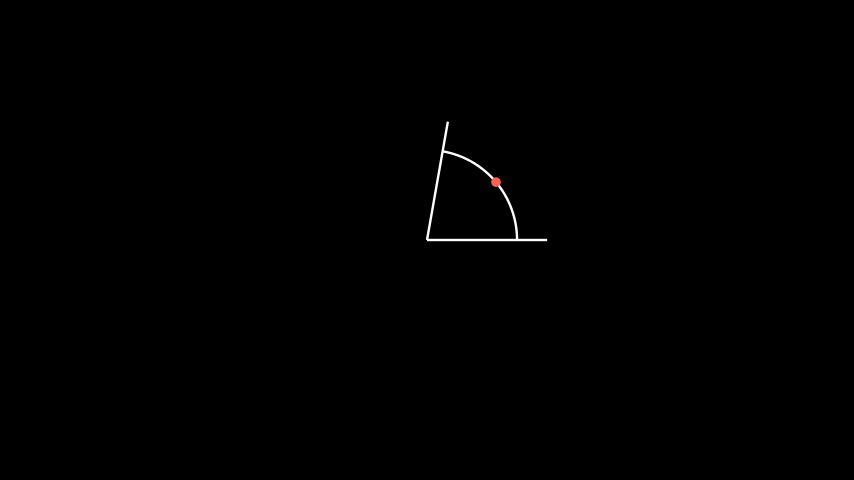
- get_midpoint()[source]
Get Point3Ds of the middle of the path that forms the
Mobject.Examples
Example: AngleMidPoint 
from manim import *

class AngleMidPoint(Scene):
    def construct(self):
        line1 = Line(ORIGIN, 2*RIGHT)
        line2 = Line(ORIGIN, 2*RIGHT).rotate_about_origin(80*DEGREES)

        a = Angle(line1, line2, radius=1.5, other_angle=False)
        d = Dot(a.get_midpoint()).set_color(RED)

        self.add(line1, line2, a, d)
        self.wait()
class AngleMidPoint(Scene): def construct(self): line1 = Line(ORIGIN, 2*RIGHT) line2 = Line(ORIGIN, 2*RIGHT).rotate_about_origin(80*DEGREES) a = Angle(line1, line2, radius=1.5, other_angle=False) d = Dot(a.get_midpoint()).set_color(RED) self.add(line1, line2, a, d) self.wait()- Return type:
- static get_mobject_type_class()[source]
Return the base class of this mobject type.
- Return type:
type[Mobject]
- get_nadir()[source]
Get nadir (opposite the zenith) Point3Ds of a box bounding a 3D
Mobject.- Return type:
- get_point_mobject(center=None)[source]
The simplest
Mobjectto be transformed to or from self. Should by a point of the appropriate type
- get_start()[source]
Returns the point, where the stroke that surrounds the
Mobjectstarts.- Return type:
- get_start_and_end()[source]
Returns starting and ending point of a stroke as a
tuple.- Return type:
tuple[TypeAliasForwardRef(‘~manim.typing.Point3D’), TypeAliasForwardRef(‘~manim.typing.Point3D’)]
- get_time_based_updaters()[source]
Return all updaters using the
dtparameter.The updaters use this parameter as the input for difference in time.
- Returns:
The list of time based updaters.
- Return type:
List[
Callable]
See also
- get_updaters()[source]
Return all updaters.
- Returns:
The list of updaters.
- Return type:
List[
Callable]
See also
- get_x(direction=array([0., 0., 0.]))[source]
Returns x Point3D of the center of the
Mobjectasfloat- Parameters:
direction (Vector3DLike)
- Return type:
float
- get_y(direction=array([0., 0., 0.]))[source]
Returns y Point3D of the center of the
Mobjectasfloat- Parameters:
direction (Vector3DLike)
- Return type:
float
- get_z(direction=array([0., 0., 0.]))[source]
Returns z Point3D of the center of the
Mobjectasfloat- Parameters:
direction (Vector3DLike)
- Return type:
float
- has_time_based_updater()[source]
Test if
selfhas a time based updater.- Returns:
Trueif at least one updater uses thedtparameter,Falseotherwise.- Return type:
bool
See also
- property height: float
The height of the mobject.
- Return type:
float
Examples
Example: HeightExample 
from manim import *

class HeightExample(Scene):
    def construct(self):
        decimal = DecimalNumber().to_edge(UP)
        rect = Rectangle(color=BLUE)
        rect_copy = rect.copy().set_stroke(GRAY, opacity=0.5)

        decimal.add_updater(lambda d: d.set_value(rect.height))

        self.add(rect_copy, rect, decimal)
        self.play(rect.animate.set(height=5))
        self.wait()
class HeightExample(Scene):
    def construct(self):
        decimal = DecimalNumber().to_edge(UP)
        rect = Rectangle(color=BLUE)
        rect_copy = rect.copy().set_stroke(GRAY, opacity=0.5)

        decimal.add_updater(lambda d: d.set_value(rect.height))

        self.add(rect_copy, rect, decimal)
        self.play(rect.animate.set(height=5))
        self.wait()
See also
- init_colors()[source]
Initializes the colors.
Gets called upon creation. This is an empty method that can be implemented by subclasses.
- Return type:
object
- insert(index, mobject)[source]
Inserts a mobject at a specific position into self.submobjects
Effectively just calls
self.submobjects.insert(index, mobject), whereself.submobjectsis a list.Highly adapted from
Mobject.add.- Parameters:
index (int) – The index at which
mobject (Mobject) – The mobject to be inserted.
- Return type:
None
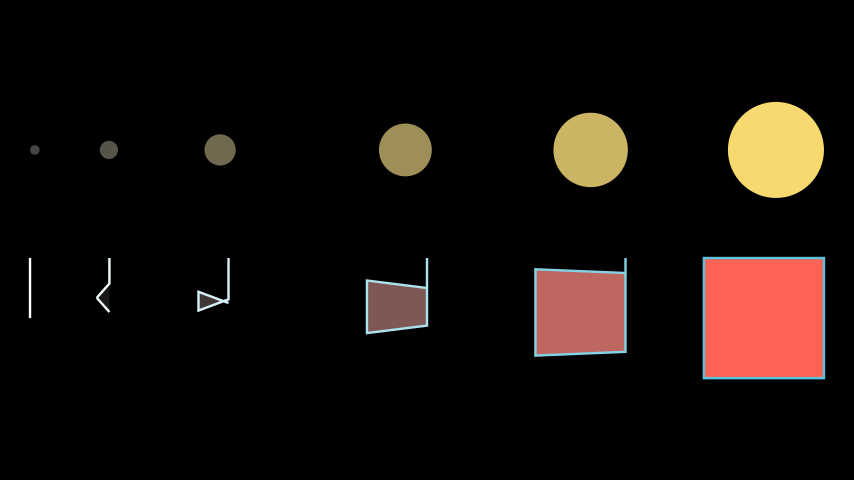
- interpolate(mobject1, mobject2, alpha, path_func=<function interpolate>)[source]
Turns this
Mobjectinto an interpolation betweenmobject1andmobject2.The interpolation is applied to the points and color of the mobject.
- Parameters:
mobject1 (Mobject) – The starting Mobject.
mobject2 (Mobject) – The target Mobject.
alpha (float) – Interpolation factor between 0 (at
mobject1) and 1 (atmobject2).path_func (PathFuncType) – The function defining the interpolation path. Defaults to a straight path.
- Returns:
self- Return type:
Note
Both mobjects must have the same number of points. If not, this will raise an error. Use
align_points()to match point counts beforehand if needed.This method is used internally by the
Transformanimation to interpolate between two mobjects during a transformation.
Examples
Example: InterpolateExample 
from manim import *

class InterpolateExample(Scene):
    def construct(self):
        # No need for point alignment:
        dotL = Dot(color=DARK_GREY).to_edge(LEFT)
        dotR = Dot(color=YELLOW).scale(10).to_edge(RIGHT)
        dotMid1 = VMobject().interpolate(dotL, dotR, alpha=0.1)
        dotMid2 = VMobject().interpolate(dotL, dotR, alpha=0.25)
        dotMid3 = VMobject().interpolate(dotL, dotR, alpha=0.5)
        dotMid4 = VMobject().interpolate(dotL, dotR, alpha=0.75)
        dots = VGroup(dotL, dotR, dotMid1, dotMid2, dotMid3, dotMid4)

        # Needs point alignment:
        line = Line(ORIGIN, UP).to_edge(LEFT)
        sq = Square(color=RED, fill_opacity=1, stroke_color=BLUE).to_edge(RIGHT)
        line.align_points(sq)
        mid1 = VMobject().interpolate(line, sq, alpha=0.1)
        mid2 = VMobject().interpolate(line, sq, alpha=0.25)
        mid3 = VMobject().interpolate(line, sq, alpha=0.5)
        mid4 = VMobject().interpolate(line, sq, alpha=0.75)
        linesquares = VGroup(line, sq, mid1, mid2, mid3, mid4)

        self.add(VGroup(dots, linesquares).arrange(DOWN, buff=1))
class InterpolateExample(Scene):
    def construct(self):
        # No need for point alignment:
        dotL = Dot(color=DARK_GREY).to_edge(LEFT)
        dotR = Dot(color=YELLOW).scale(10).to_edge(RIGHT)
        dotMid1 = VMobject().interpolate(dotL, dotR, alpha=0.1)
        dotMid2 = VMobject().interpolate(dotL, dotR, alpha=0.25)
        dotMid3 = VMobject().interpolate(dotL, dotR, alpha=0.5)
        dotMid4 = VMobject().interpolate(dotL, dotR, alpha=0.75)
        dots = VGroup(dotL, dotR, dotMid1, dotMid2, dotMid3, dotMid4)

        # Needs point alignment:
        line = Line(ORIGIN, UP).to_edge(LEFT)
        sq = Square(color=RED, fill_opacity=1, stroke_color=BLUE).to_edge(RIGHT)
        line.align_points(sq)
        mid1 = VMobject().interpolate(line, sq, alpha=0.1)
        mid2 = VMobject().interpolate(line, sq, alpha=0.25)
        mid3 = VMobject().interpolate(line, sq, alpha=0.5)
        mid4 = VMobject().interpolate(line, sq, alpha=0.75)
        linesquares = VGroup(line, sq, mid1, mid2, mid3, mid4)

        self.add(VGroup(dots, linesquares).arrange(DOWN, buff=1))
See also
Transform,align_points(),interpolate_color()
- invert(recursive=False)[source]
Inverts the list of
submobjects.- Parameters:
recursive (bool) – If
True, all submobject lists of this mobject’s family are inverted.- Return type:
None
Examples
Example: InvertSumobjectsExample 
from manim import *

class InvertSumobjectsExample(Scene):
    def construct(self):
        s = VGroup(*[Dot().shift(i*0.1*RIGHT) for i in range(-20,20)])
        s2 = s.copy()
        s2.invert()
        s2.shift(DOWN)
        self.play(Write(s), Write(s2))
class InvertSumobjectsExample(Scene):
    def construct(self):
        s = VGroup(*[Dot().shift(i*0.1*RIGHT) for i in range(-20,20)])
        s2 = s.copy()
        s2.invert()
        s2.shift(DOWN)
        self.play(Write(s), Write(s2))
- length_over_dim(dim)[source]
Measure the length of an
Mobjectin a certain direction.- Parameters:
dim (int)
- Return type:
float
- match_color(mobject)[source]
Match the color with the color of another
Mobject.- Parameters:
mobject (Mobject)
- Return type:
Self
- match_coord(mobject, dim, direction=array([0., 0., 0.]))[source]
Match the Point3Ds with the Point3Ds of another
Mobject.- Parameters:
mobject (Mobject)
dim (int)
direction (Vector3DLike)
- Return type:
Self
- match_depth(mobject, **kwargs)[source]
Match the depth with the depth of another
Mobject.- Parameters:
mobject (Mobject)
- Return type:
Self
- match_dim_size(mobject, dim, **kwargs)[source]
Match the specified dimension with the dimension of another
Mobject.- Parameters:
mobject (Mobject)
dim (int)
- Return type:
Self
- match_height(mobject, **kwargs)[source]
Match the height with the height of another
Mobject.- Parameters:
mobject (Mobject)
- Return type:
Self
- match_points(mobject, copy_submobjects=True)[source]
Edit points, positions, and submobjects to be identical to another
Mobject, while keeping the style unchanged.Examples
Example: MatchPointsScene 
from manim import *

class MatchPointsScene(Scene):
    def construct(self):
        circ = Circle(fill_color=RED, fill_opacity=0.8)
        square = Square(fill_color=BLUE, fill_opacity=0.2)
        self.add(circ)
        self.wait(0.5)
        self.play(circ.animate.match_points(square))
        self.wait(0.5)
class MatchPointsScene(Scene): def construct(self): circ = Circle(fill_color=RED, fill_opacity=0.8) square = Square(fill_color=BLUE, fill_opacity=0.2) self.add(circ) self.wait(0.5) self.play(circ.animate.match_points(square)) self.wait(0.5)- Parameters:
mobject (Mobject)
copy_submobjects (bool)
- Return type:
Self
- match_updaters(mobject)[source]
Match the updaters of the given mobject.
- Parameters:
mobject (Mobject) – The mobject whose updaters get matched.
- Returns:
self- Return type:
Note
All updaters from submobjects are removed, but only updaters of the given mobject are matched, not those of it’s submobjects.
See also
- match_width(mobject, **kwargs)[source]
Match the width with the width of another
Mobject.- Parameters:
mobject (Mobject)
- Return type:
Self
- match_x(mobject, direction=array([0., 0., 0.]))[source]
Match x coord. to the x coord. of another
Mobject.- Parameters:
mobject (Mobject)
- Return type:
Self
- match_y(mobject, direction=array([0., 0., 0.]))[source]
Match y coord. to the x coord. of another
Mobject.- Parameters:
mobject (Mobject)
- Return type:
Self
- match_z(mobject, direction=array([0., 0., 0.]))[source]
Match z coord. to the x coord. of another
Mobject.- Parameters:
mobject (Mobject)
- Return type:
Self
- move_to(point_or_mobject, aligned_edge=array([0., 0., 0.]), coor_mask=array([1, 1, 1]))[source]
Move center of the
Mobjectto certain Point3D.- Parameters:
point_or_mobject (Point3DLike | Mobject)
aligned_edge (Vector3DLike)
coor_mask (Vector3DLike)
- Return type:
Self
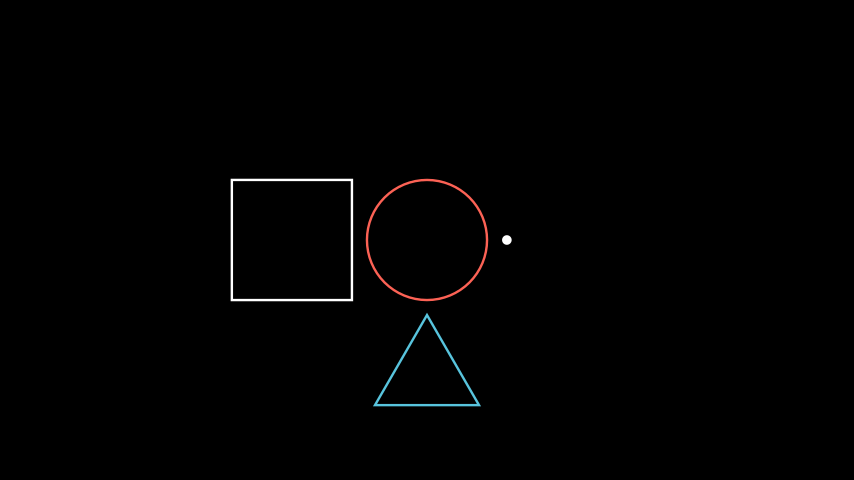
- next_to(mobject_or_point, direction=array([1., 0., 0.]), buff=0.25, aligned_edge=array([0., 0., 0.]), submobject_to_align=None, index_of_submobject_to_align=None, coor_mask=array([1, 1, 1]))[source]
Move this
Mobjectnext to another’sMobjector Point3D.Examples
Example: GeometricShapes 
from manim import *

class GeometricShapes(Scene):
    def construct(self):
        d = Dot()
        c = Circle()
        s = Square()
        t = Triangle()
        d.next_to(c, RIGHT)
        s.next_to(c, LEFT)
        t.next_to(c, DOWN)
        self.add(d, c, s, t)
class GeometricShapes(Scene): def construct(self): d = Dot() c = Circle() s = Square() t = Triangle() d.next_to(c, RIGHT) s.next_to(c, LEFT) t.next_to(c, DOWN) self.add(d, c, s, t)- Parameters:
mobject_or_point (Mobject | Point3DLike)
direction (Vector3DLike)
buff (float)
aligned_edge (Vector3DLike)
submobject_to_align (Mobject | None)
index_of_submobject_to_align (int | None)
coor_mask (Vector3DLike)
- Return type:
Self
- null_point_align(mobject)[source]
If a
Mobjectwith points is being aligned to one without, treat both as groups, and push the one with points into its own submobjects list.
- reduce_across_dimension(reduce_func, dim)[source]
Find the min or max value from a dimension across all points in this and submobjects.
- Parameters:
reduce_func (Callable)
dim (int)
- remove(*mobjects)[source]
Remove
submobjects.The mobjects are removed from
submobjects, if they exist.Subclasses of mobject may implement
-and-=dunder methods.See also
- remove_updater(update_function)[source]
Remove an updater.
If the same updater is applied multiple times, every instance gets removed.
- Parameters:
update_function (Updater) – The update function to be removed.
- Returns:
self- Return type:
See also
- repeat(count)[source]
This can make transition animations nicer
- Parameters:
count (int)
- Return type:
Self
- restore()[source]
Restores the state that was previously saved with
save_state().- Return type:
Self
- resume_updating(recursive=True)[source]
Enable updating from updaters and animations.
- Parameters:
recursive (bool) – Whether to recursively enable updating on all submobjects.
- Returns:
self- Return type:
See also
- rotate(angle, axis=array([0., 0., 1.]), *, about_point=None, about_edge=None)[source]
Rotates the
Mobjectaround a specified axis and point.- Parameters:
angle (float) – The angle of rotation in radians. Predefined constants such as
DEGREEScan also be used to specify the angle in degrees.axis (Vector3DLike) – The rotation axis (see
Rotatingfor more).about_point (Point3DLike | None) – The point about which the mobject rotates. If
None, rotation occurs around the center of the mobject.about_edge (Vector3DLike | None) – The edge about which to apply the scaling.
- Returns:
self(for method chaining)- Return type:
Note
To animate a rotation, use
RotatingorRotateinstead of.animate.rotate(...). The.animate.rotate(...)syntax only applies a transformation from the initial state to the final rotated state (interpolation between the two states), without showing proper rotational motion based on the angle (from 0 to the given angle).Examples
Example: RotateMethodExample 
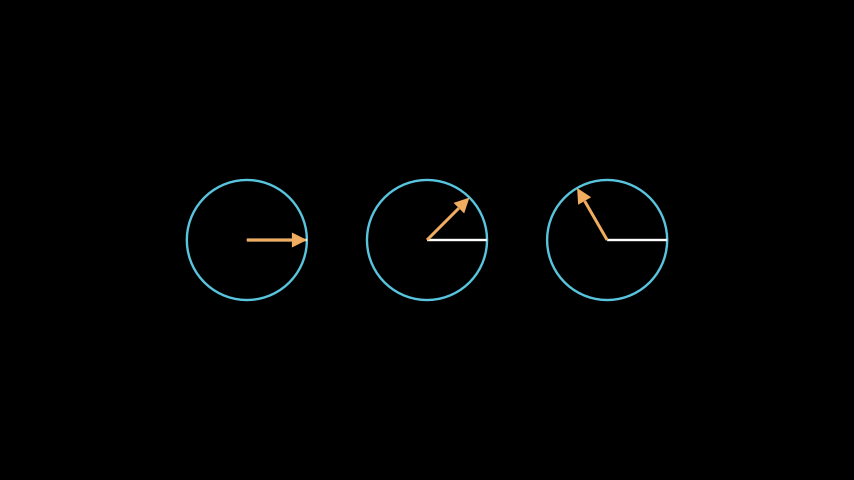
from manim import *

class RotateMethodExample(Scene):
    def construct(self):
        circle = Circle(radius=1, color=BLUE)
        line = Line(start=ORIGIN, end=RIGHT)
        arrow1 = Arrow(start=ORIGIN, end=RIGHT, buff=0, color=GOLD)
        group1 = VGroup(circle, line, arrow1)

        group2 = group1.copy()
        arrow2 = group2[2]
        arrow2.rotate(angle=PI / 4, about_point=arrow2.get_start())

        group3 = group1.copy()
        arrow3 = group3[2]
        arrow3.rotate(angle=120 * DEGREES, about_point=arrow3.get_start())

        self.add(VGroup(group1, group2, group3).arrange(RIGHT, buff=1))
class RotateMethodExample(Scene):
    def construct(self):
        circle = Circle(radius=1, color=BLUE)
        line = Line(start=ORIGIN, end=RIGHT)
        arrow1 = Arrow(start=ORIGIN, end=RIGHT, buff=0, color=GOLD)
        group1 = VGroup(circle, line, arrow1)

        group2 = group1.copy()
        arrow2 = group2[2]
        arrow2.rotate(angle=PI / 4, about_point=arrow2.get_start())

        group3 = group1.copy()
        arrow3 = group3[2]
        arrow3.rotate(angle=120 * DEGREES, about_point=arrow3.get_start())

        self.add(VGroup(group1, group2, group3).arrange(RIGHT, buff=1))
- rotate_about_origin(angle, axis=array([0., 0., 1.]))[source]
Rotates the
Mobjectabout the ORIGIN, which is at [0,0,0].- Parameters:
angle (float)
axis (Vector3DLike)
- Return type:
Self
- save_image(name=None)[source]
Saves an image of only this
Mobjectat its position to a png file.- Parameters:
name (str | None)
- Return type:
None
- save_state()[source]
Save the current state (position, color & size). Can be restored with
restore().- Return type:
Self
- scale(scale_factor, *, about_point=None, about_edge=None)[source]
Scale the size by a factor.
Default behavior is to scale about the center of the mobject.
- Parameters:
scale_factor (float) – The scaling factor \(\alpha\). If \(0 < |\alpha| < 1\), the mobject will shrink, and for \(|\alpha| > 1\) it will grow. Furthermore, if \(\alpha < 0\), the mobject is also flipped.
about_point (Point3DLike | None) – The point about which to apply the scaling.
about_edge (Vector3DLike | None) – The edge about which to apply the scaling.
- Returns:
self- Return type:
Examples
Example: MobjectScaleExample 
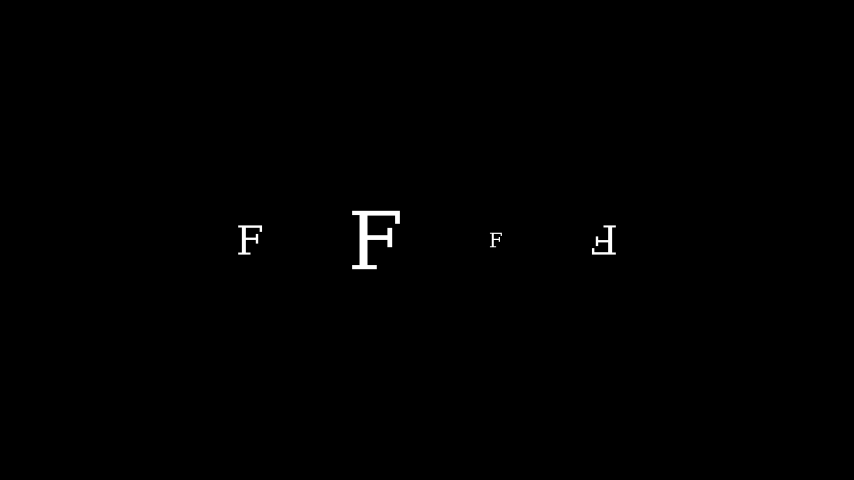
from manim import *

class MobjectScaleExample(Scene):
    def construct(self):
        f1 = Text("F")
        f2 = Text("F").scale(2)
        f3 = Text("F").scale(0.5)
        f4 = Text("F").scale(-1)

        vgroup = VGroup(f1, f2, f3, f4).arrange(6 * RIGHT)
        self.add(vgroup)
class MobjectScaleExample(Scene):
    def construct(self):
        f1 = Text("F")
        f2 = Text("F").scale(2)
        f3 = Text("F").scale(0.5)
        f4 = Text("F").scale(-1)

        vgroup = VGroup(f1, f2, f3, f4).arrange(6 * RIGHT)
        self.add(vgroup)
See also
- scale_to_fit_depth(depth, **kwargs)[source]
Scales the
Mobjectto fit a depth while keeping width/height proportional.- Parameters:
depth (float)
- Return type:
Self
- scale_to_fit_height(height, **kwargs)[source]
Scales the
Mobjectto fit a height while keeping width/depth proportional.- Returns:
self- Return type:
- Parameters:
height (float)
Examples
>>> from manim import *
>>> sq = Square()
>>> sq.width
np.float64(2.0)
>>> sq.scale_to_fit_height(5)
Square
>>> sq.height
np.float64(5.0)
>>> sq.width
np.float64(5.0)
- scale_to_fit_width(width, **kwargs)[source]
Scales the
Mobjectto fit a width while keeping height/depth proportional.- Returns:
self- Return type:
- Parameters:
width (float)
Examples
>>> from manim import *
>>> sq = Square()
>>> sq.height
np.float64(2.0)
>>> sq.scale_to_fit_width(5)
Square
>>> sq.width
np.float64(5.0)
>>> sq.height
np.float64(5.0)
- set(**kwargs)[source]
Sets attributes.
I.e.
my_mobject.set(foo=1)appliesmy_mobject.foo = 1.This is a convenience to be used along with
animateto animate setting attributes.In addition to this method, there is a compatibility layer that allows
get_*andset_*methods to get and set generic attributes. For instance:>>> mob = Mobject() >>> mob.set_foo(0) Mobject >>> mob.get_foo() 0 >>> mob.foo 0
This compatibility layer does not interfere with any
get_*orset_*methods that are explicitly defined.Warning
This compatibility layer is for backwards compatibility and is not guaranteed to stay around. Where applicable, please prefer getting/setting attributes normally or with the
set()method.- Parameters:
**kwargs – The attributes and corresponding values to set.
- Returns:
self- Return type:
Examples
>>> mob = Mobject()
>>> mob.set(foo=0)
Mobject
>>> mob.foo
0
- set_color(color=ManimColor('#FFFF00'), family=True)[source]
Condition is function which takes in one arguments, (x, y, z). Here it just recurses to submobjects, but in subclasses this should be further implemented based on the the inner workings of color
- Parameters:
color (ParsableManimColor)
family (bool)
- Return type:
Self
- set_color_by_gradient(*colors)[source]
- Parameters:
colors (ParsableManimColor) – The colors to use for the gradient. Use like set_color_by_gradient(RED, BLUE, GREEN).
ManimColor.parse(color) (self.color =)
self (return)
- Return type:
Self
- classmethod set_default(**kwargs)[source]
Sets the default values of keyword arguments.
If this method is called without any additional keyword arguments, the original default values of the initialization method of this class are restored.
- Parameters:
kwargs – Passing any keyword argument will update the default values of the keyword arguments of the initialization function of this class.
- Return type:
None
Examples
>>> from manim import Square, GREEN
>>> Square.set_default(color=GREEN, fill_opacity=0.25)
>>> s = Square(); s.color, s.fill_opacity
(ManimColor('#83C167'), 0.25)
>>> Square.set_default()
>>> s = Square(); s.color, s.fill_opacity
(ManimColor('#FFFFFF'), 0.0)
Example: ChangedDefaultTextcolor 
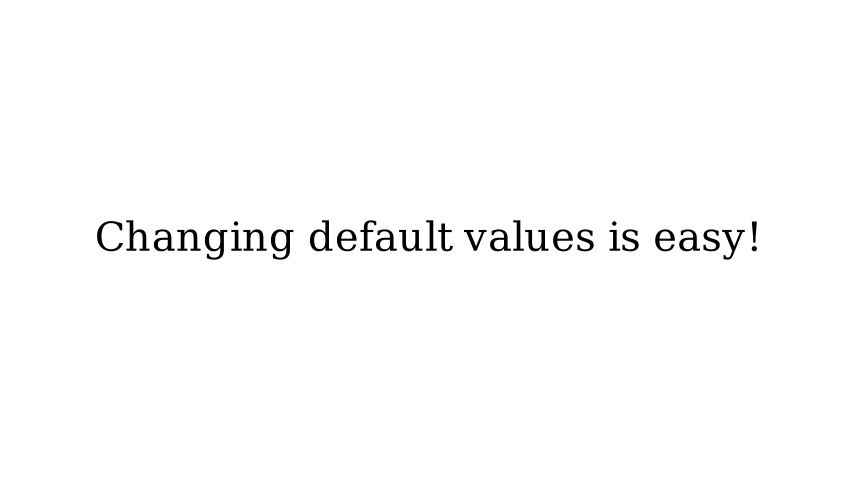
from manim import *

config.background_color = WHITE

class ChangedDefaultTextcolor(Scene):
    def construct(self):
        Text.set_default(color=BLACK)
        self.add(Text("Changing default values is easy!"))

        # we revert the colour back to the default to prevent a bug in the docs.
        Text.set_default(color=WHITE)
config.background_color = WHITE

class ChangedDefaultTextcolor(Scene):
    def construct(self):
        Text.set_default(color=BLACK)
        self.add(Text("Changing default values is easy!"))

        # we revert the colour back to the default to prevent a bug in the docs.
        Text.set_default(color=WHITE)
- set_x(x, direction=array([0., 0., 0.]))[source]
Set x value of the center of the
Mobject(intorfloat)- Parameters:
x (float)
direction (Vector3DLike)
- Return type:
Self
- set_y(y, direction=array([0., 0., 0.]))[source]
Set y value of the center of the
Mobject(intorfloat)- Parameters:
y (float)
direction (Vector3DLike)
- Return type:
Self
- set_z(z, direction=array([0., 0., 0.]))[source]
Set z value of the center of the
Mobject(intorfloat)- Parameters:
z (float)
direction (Vector3DLike)
- Return type:
Self
- set_z_index(z_index_value, family=True)[source]
Sets the
Mobject’sz_indexto the value specified in z_index_value.- Parameters:
z_index_value (float) – The new value of
z_indexset.family (bool) – If
True, thez_indexvalue of all submobjects is also set.
- Returns:
The Mobject itself, after
z_indexis set. For chaining purposes. (Returns self.)- Return type:
Examples
Example: SetZIndex 
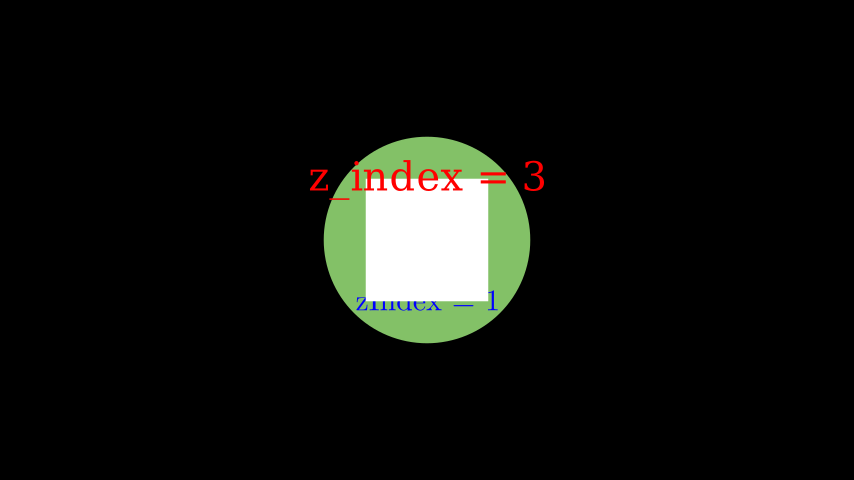
from manim import *

class SetZIndex(Scene):
    def construct(self):
        text = Text('z_index = 3', color = PURE_RED).shift(UP).set_z_index(3)
        square = Square(2, fill_opacity=1).set_z_index(2)
        tex = Tex(r'zIndex = 1', color = PURE_BLUE).shift(DOWN).set_z_index(1)
        circle = Circle(radius = 1.7, color = GREEN, fill_opacity = 1) # z_index = 0

        # Displaying order is now defined by z_index values
        self.add(text)
        self.add(square)
        self.add(tex)
        self.add(circle)
class SetZIndex(Scene):
    def construct(self):
        text = Text('z_index = 3', color = PURE_RED).shift(UP).set_z_index(3)
        square = Square(2, fill_opacity=1).set_z_index(2)
        tex = Tex(r'zIndex = 1', color = PURE_BLUE).shift(DOWN).set_z_index(1)
        circle = Circle(radius = 1.7, color = GREEN, fill_opacity = 1) # z_index = 0

        # Displaying order is now defined by z_index values
        self.add(text)
        self.add(square)
        self.add(tex)
        self.add(circle)
- set_z_index_by_z_Point3D()[source]
Sets the
Mobject’s z Point3D to the value ofz_index.- Returns:
The Mobject itself, after
z_indexis set. (Returns self.)- Return type:
- shift(*vectors)[source]
Shift by the given vectors.
- Parameters:
vectors (Vector3DLike) – Vectors to shift by. If multiple vectors are given, they are added together.
- Returns:
self- Return type:
See also
- shuffle(recursive=False)[source]
Shuffles the list of
submobjects.- Parameters:
recursive (bool)
- Return type:
None
- shuffle_submobjects(*args, **kwargs)[source]
Shuffles the order of
submobjectsExamples
Example: ShuffleSubmobjectsExample 
from manim import *

class ShuffleSubmobjectsExample(Scene):
    def construct(self):
        s= VGroup(*[Dot().shift(i*0.1*RIGHT) for i in range(-20,20)])
        s2= s.copy()
        s2.shuffle_submobjects()
        s2.shift(DOWN)
        self.play(Write(s), Write(s2))
class ShuffleSubmobjectsExample(Scene): def construct(self): s= VGroup(*[Dot().shift(i*0.1*RIGHT) for i in range(-20,20)]) s2= s.copy() s2.shuffle_submobjects() s2.shift(DOWN) self.play(Write(s), Write(s2))- Return type:
None
- sort(point_to_num_func=<function Mobject.<lambda>>, submob_func=None)[source]
Sorts the list of
submobjectsby a function defined bysubmob_func.- Parameters:
point_to_num_func (Callable[[Point3DLike], float])
submob_func (Callable[[Mobject], Any] | None)
- Return type:
Self
- sort_submobjects(*args, **kwargs)[source]
Sort the
submobjects- Return type:
Self
- stretch_to_fit_depth(depth, **kwargs)[source]
Stretches the
Mobjectto fit a depth, not keeping width/height proportional.- Parameters:
depth (float)
- Return type:
Self
- stretch_to_fit_height(height, **kwargs)[source]
Stretches the
Mobjectto fit a height, not keeping width/depth proportional.- Returns:
self- Return type:
- Parameters:
height (float)
Examples
>>> from manim import *
>>> sq = Square()
>>> sq.width
np.float64(2.0)
>>> sq.stretch_to_fit_height(5)
Square
>>> sq.height
np.float64(5.0)
>>> sq.width
np.float64(2.0)
- stretch_to_fit_width(width, **kwargs)[source]
Stretches the
Mobjectto fit a width, not keeping height/depth proportional.- Returns:
self- Return type:
- Parameters:
width (float)
Examples
>>> from manim import *
>>> sq = Square()
>>> sq.height
np.float64(2.0)
>>> sq.stretch_to_fit_width(5)
Square
>>> sq.width
np.float64(5.0)
>>> sq.height
np.float64(2.0)
- suspend_updating(recursive=True)[source]
Disable updating from updaters and animations.
- Parameters:
recursive (bool) – Whether to recursively suspend updating on all submobjects.
- Returns:
self- Return type:
See also
- to_corner(corner=array([-1., -1., 0.]), buff=0.5)[source]
Moves this
Mobjectto the given corner of the screen.- Returns:
The newly positioned mobject.
- Return type:
- Parameters:
corner (Vector3DLike)
buff (float)
Examples
Example: ToCornerExample 

from manim import *

class ToCornerExample(Scene):
    def construct(self):
        c = Circle()
        c.to_corner(UR)
        t = Tex("To the corner!")
        t2 = MathTex("x^3").shift(DOWN)
        self.add(c,t,t2)
        t.to_corner(DL, buff=0)
        t2.to_corner(UL, buff=1.5)
class ToCornerExample(Scene):
    def construct(self):
        c = Circle()
        c.to_corner(UR)
        t = Tex("To the corner!")
        t2 = MathTex("x^3").shift(DOWN)
        self.add(c,t,t2)
        t.to_corner(DL, buff=0)
        t2.to_corner(UL, buff=1.5)
- to_edge(edge=array([-1., 0., 0.]), buff=0.5)[source]
Moves this
Mobjectto the given edge of the screen, without affecting its position in the other dimension.- Returns:
The newly positioned mobject.
- Return type:
- Parameters:
edge (Vector3DLike)
buff (float)
Examples
Example: ToEdgeExample 

from manim import *

class ToEdgeExample(Scene):
    def construct(self):
        tex_top = Tex("I am at the top!")
        tex_top.to_edge(UP)
        tex_side = Tex("I am moving to the side!")
        c = Circle().shift(2*DOWN)
        self.add(tex_top, tex_side, c)
        tex_side.to_edge(LEFT)
        c.to_edge(RIGHT, buff=0)
class ToEdgeExample(Scene):
    def construct(self):
        tex_top = Tex("I am at the top!")
        tex_top.to_edge(UP)
        tex_side = Tex("I am moving to the side!")
        c = Circle().shift(2*DOWN)
        self.add(tex_top, tex_side, c)
        tex_side.to_edge(LEFT)
        c.to_edge(RIGHT, buff=0)
- update(dt=0, recursive=True)[source]
Apply all updaters.
Does nothing if updating is suspended.
- Parameters:
dt (float) – The parameter
dtto pass to the update functions. Usually this is the time in seconds since the last call ofupdate.recursive (bool) – Whether to recursively update all submobjects.
- Returns:
self- Return type:
See also
- property width: float
The width of the mobject.
- Return type:
float
Examples
Example: WidthExample 
from manim import *

class WidthExample(Scene):
    def construct(self):
        decimal = DecimalNumber().to_edge(UP)
        rect = Rectangle(color=BLUE)
        rect_copy = rect.copy().set_stroke(GRAY, opacity=0.5)

        decimal.add_updater(lambda d: d.set_value(rect.width))

        self.add(rect_copy, rect, decimal)
        self.play(rect.animate.set(width=7))
        self.wait()
class WidthExample(Scene):
    def construct(self):
        decimal = DecimalNumber().to_edge(UP)
        rect = Rectangle(color=BLUE)
        rect_copy = rect.copy().set_stroke(GRAY, opacity=0.5)

        decimal.add_updater(lambda d: d.set_value(rect.width))

        self.add(rect_copy, rect, decimal)
        self.play(rect.animate.set(width=7))
        self.wait()
See also